Against my better judgment, I've once again become completely and utterly hooked on chess. There's something endlessly fascinating about maneuvering through the limitless combinations of every piece on the board, pursuing the singular purpose of checkmating the opponent's king. A knight can leap across the board, a bishop slices through diagonals, pawns quietly set the stage for bigger plays, and queens wreak havoc no matter where they're placed. The path to improvement is earned the hard way - consistent victory comes only through meticulous planning, a robust memory of past games, and careful use of the right piece at the right time.
As with any aspiring grandmaster, part of getting better at chess naturally involves playing against the computer, which can be either the most frustrating or rewarding experience imaginable. How are you supposed to beat an intelligent system that can actively plan seven steps ahead of every move you make, with the explicit goal of crushing you in the most demoralizing way possible? Defeating these chess engines at progressively difficult levels is part of any reasonable improvement strategy, but I've always wondered: how do they actually work? And while these systems aren't identical to what we'll discuss today, they do lead us perfectly to our main topic - AI agents.
Over the past year, the term "agent" has exploded across the tech landscape. You've probably seen it attached to just about every new idea or product pitch: agentic workflows, agentic commerce, agentic marketing platforms, agentic customer service solutions - the list goes on, and on, and on. In my opinion, the momentum feels strikingly similar to the surge of excitement we saw when ChatGPT first launched nearly three years ago. But this all begs the question - just what exactly is an agent?
That's the question we're going to tackle today. My goal is to cut through the noise, clarify what an agent actually is, and explain why it matters. Because while the concept is still in its early stages, the potential for disruption over the next few years is enormous. And the best part? We won't just talk about it...we'll build an agent from scratch together.
What is an Agent?
Let's begin by addressing the core topic for today. In preparing for this post, I researched extensively across credible websites, blogs, and videos, searching for a consistent definition that was easy to understand. What I found was, well... ambigous to say the least. Here are just a few of the definitions I encountered:
- "AI agents are software systems that use AI to pursue goals and complete tasks on behalf of users"
- "An AI agent is a software component that has the agency to act on behalf of a user or a system to perform tasks"
- "An AI agent is an entity that can act autonomously in an environment. It can take information from its surroundings, make decisions based on that data, and act to transform those circumstances—physical, digital, or mixed"
- "An artificial intelligence (AI) agent is a software program that can interact with its environment, collect data, and use the data to perform self-determined tasks to meet predetermined goals"
I'm sure you'll agree with me that these definitions feel vague. Sure, they all more or less tell us that agents are "autonomous software systems that work to accomplish a goal", but they sidestep the fascinating part, which is the "how". How can a large language model (LLM) transform from a simple question & answering tool into something that can independently plan, decide, and act?
Enter this excellent video by the Anthropic team I came across a few months ago, where they discuss this very question. In Tips for Building Agents, Anthropic researcher Erik provides what I believe is the clearest definition of what an agent actually is:
"...What we think an agent is, is where you're letting the LLM decide sort of how many times to run. You're having it continuing to loop until it's found a resolution".
For my less technical readers, a "loop" is a programming construct that repeats an action either a specific number of times, or until an explicit condition is met. For example, here's a Python loop that counts to 5 and prints out the current number during each iteration:
for i in range(0,5): print(i)
1
2
3
4
5
In the context of an agent, Erik's definition means using a loop to have an LLM continuously process and evaluate its own output until it achieves a provided goal. Expanding on our simple loop from above, we can imagine reframing that example into something like the below pseudocode to create that desired "loop until it's found a resolution" behavior Erik mentioned:
# Define a placeholder variable for the LLM's response
response = None

while True:
  # Initiate LLM call with text / question
  response = llm.chat(input="What is the current temperature outside?")
  # If the response is the final answer, than break the loop
  if response == final_response: break
The elegance lies in its simplicity. Instead of manually engineering complex control systems, we let the LLM decide when it has reached a satisfactory resolution and should break the loop. But a loop on its own isn't enough - by itself, the model lacks the structure to consistently plan and act with precision. To truly enable autonomous behavior, most modern AI agents rely on a few fundamental building blocks that work together to give the LLM the scaffolding it needs to think, plan, and make decisions.
I particularly like how this article from Prompting Guide distills those building blocks into three clear components:
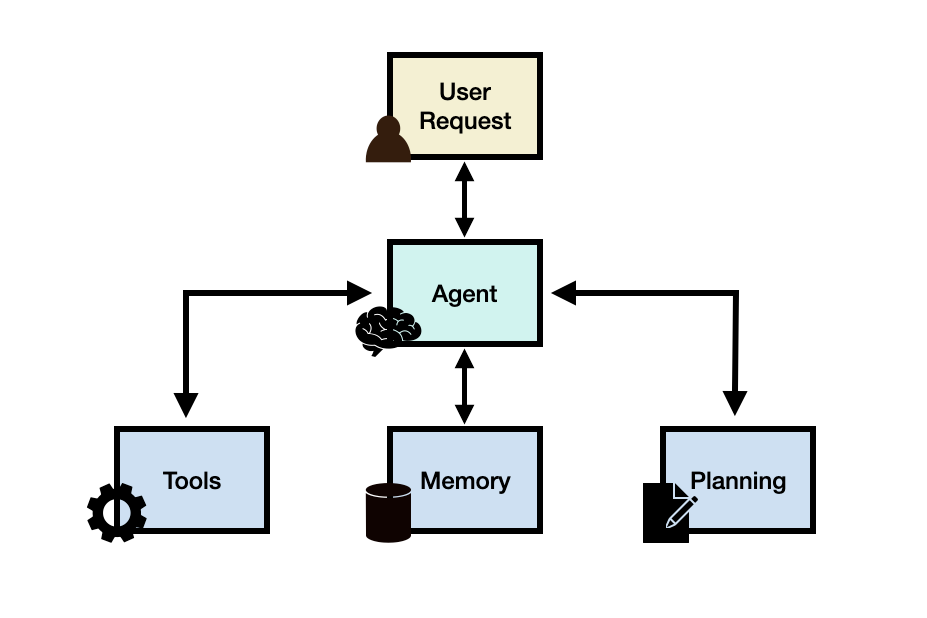
- Tools: What tools does the agent have available to interact with external environements?
- Memory: How does the agent manage & recall it's past interactions to aid in future decisions?
- Planning: What steps should the agent follow when making a decision?
When these components work together, they enable the "loop until resolution" behavior that we are seeking. After being provided with a goal, the agent can plan an approach (Planning), recall past interactions to determine what new information it needs (Memory), use tools to gather that information (Tools), and then replan (Planning) - continuing this cycle through a loop until it reaches a satisfactory solution, all without human intervention.
If this sounds abstract, don't worry! We're going to break each building block in depth in the sections ahead by showing exactly how to implement each one from scratch, before rolling them into our own agent framework. To make this more practical and hopefully fun, we'll build a nutrition agent whose goal is to help users figure out how many calories they should eat in a day in order to gain or lose weght, based on specific health measurement metrics provided to it.
Library Import
As always, let's setup the sections to come by importing in the libraries that we'll be using throughout remainder of this post. If you've been following my blog over the ~2 years, none of these libraries should look new as they are all more or less standard Python packages that I've leveraged previously. However, I encouage you to look any or all of them up if your unfamiliar of their exact purpose before continuing onward.
The only new library to call out is the openai-agent package, which enables building AI agents in a lightweight, easy-to-use package with few abstractions, However, we'll only be using it at the very end of this post as a benchmark to to test our own agent framework against.
try:
  # File & Text-Processing Liraries
  import os
  import json
  import re

  # Typings
  from pydantic import BaseModel, Field, PrivateAttr
  from typing import List, Dict, Any, Optional, Callable

  # ML & AI Libraries
  from openai import OpenAI
  from agents import Agent, Runner, function_tool
except:
  !pip install openai-agents -q
  from agents import Agent, Runner, function_tool
What is a Tool?
Let's begin by examining the first component of our nutrition agent's architecture - tools. Tools are external functions or services that an LLM can call on to extend its abilities beyond pure text generation. While LLMs excel at reasoning and language understanding, they lack built-in access to real-time data, advanced computations, or domain-specific APIs, all of which are needed to make an agent truly valuable in real world application or business settings. The main goal of tools is to prevent what are called "hallucinations", which are instances where even though an LLM may express confidence in it's answer, the factual content may be entirely incorrect. In my earlier post on Retrieval Augement Generation, we built a vector database from the ground up, enabling our LLM to deliver more accurate responses on targeted topics - a prime example of a tool tailored for semantic search and knowledge retrieval.
For our nutrition agent, we'll implement two specialized, but less complex tools:
tdee_calculator: Calculates Total Daily Energy Expenditure (TDEE) based on individual parameters like age, weight, height, and activity level.calorie_adjustment_calculator: Determines optimal daily caloric intake by factoring in TDEE, weight trends, and specific fitness goals.
To maintain focus on the agent architecture itself, I'm not going to dive into the mathematical formulas powering these functions, though the code below includes detailed comments if you're interested in the specifics (or just a health nut like me). The uses here are straightforward though - the tdee_calculator function determines your baseline caloric burn rate based on weekly activity patterns, while the calorie_adjustment_calculator function fine-tunes that number to align with your goals on whether you're aiming to gain, lose, or maintain weight.
Here is our tdee_calculator function:
def tdee_calculator(
    weight: float,
    weight_unit: str,
    height: float,
    height_unit: str,
    age: int,
    gender: str,
    activity_level: str):
    """
    Calculates the Total Daily Energy Expenditure (TDEE) for a person based on the given parameters.

    Inputs:
    weight (float): Weight in kilograms or pounds.
    weight_unit (str): 'kg' for kilograms or 'lb' for pounds.
    height (float): Height in centimeters or inches.
    height_unit (str): 'cm' for centimeters or 'in' for inches.
    age (int): Age in years.
    gender (str): 'male' or 'female'.
    activity_level (str): 'sedentary', 'lightly active', 'moderately active', 'very active', or 'extra active'.

    Returns:
    float: TDEE in kilocalories per day.
    """
    # Activity level mapping
    activity_levels = {
        'sedentary': 1.2,
        'lightly active': 1.375,
        'moderately active': 1.55,
        'very active': 1.725,
        'extra active': 1.9
    }
    # Determine 's' variable depending on if gender is male or female
    s = 5 if gender.lower() == 'male' else -161
    # Convert weight & height to kg and cm if needed
    weight = weight if weight_unit == 'kg' else weight * 0.454
    height = height if height_unit == 'cm' else height * 2.54
    # Calculate basal metabolic rate (BMR)
    bmr = (9.99 * weight) + (6.25 * height) - (5 * age - s)
    # Calculate total daily energy expenditure (TDEE)
    tdee = bmr * activity_levels[activity_level]
    # Return TDEE
    return round(tdee)

# Test with example arguments
tdee_calculator(weight=210, weight_unit='lb', height=76, height_unit='in', age=34, gender = 'male', activity_level='moderately active')
3091And here is our calorie_adjustment_calculator:
def calorie_adjustment_calculator(
    goal: str,
    current_weight: float,
    previous_weight: float,
    weight_unit: str,
    tdee: int):
    """
    Calculates the total kilocalories per day for a person to consume based on their TDEE, body weight trend, and fitness goal.

    Inputs:
    goal (str): Fitness goal, either 'cut', 'maintain', or 'gain'.
    current_weight (float): Current week's average weight in kilograms or pounds.
    previous_weight (float): Previous week's average weight in kilograms or pounds.
    weight_unit (str): 'kg' for kilograms or 'lb' for pounds.
    tdee (int): TDEE in kilocalories per day.

    Returns:
    int: Users new target calories intake per day.
    """
    adjustment = 0
    # Activity level mapping
    if goal == 'cut':
        adjustment = -300
    elif goal == 'gain':
        adjustment = 300

    return tdee + adjustment

# Test with example arguments
calorie_adjustment_calculator(goal='gain', weight_unit='lb', current_weight=210.1, previous_weight=211.1, tdee=3031)
3331Defining a Tool Schema
Now that we have two specialized tools built & ready to go, the next step is figuring out how to enable our nutrition agent to discover and use them. Though this problem may appear nebulous on the surface, in truth the solution is considerably more straightforward. Since LLMs fundamentally process and generate text, it stands to reason that we can expose our tools by simply describing them in plain text within the agent's context window. Therefore, the fundamental challenge we need to solve for here isn't really "how", it's "what" - specifcally, "what" text format would be most effective for an LLM to parse and understand the tools it has at it's disposal?
Luckily for us, we don't need to design this format from scratch. We can adopt the established tool schema formats used by leading LLM providers like OpenAI and Anthropic, which have already solved this problem through extensive testing and refinement. Let's examine OpenAI's approach as our foundation. Below is their tool schema for a weather function, taken directly from their Function Calling documentation:
"type": "function",
  "name": "get_weather",
  "description": "Get current temperature for a given location.",
  "parameters": {
    "type": "object",
    "properties": {
      "location": {
        "type": "string",
        "description": "City and country e.g. Bogotá, Colombia"
      }
    },
    "required": ["location"],
    "additionalProperties": False
  }
}
And for comparison, here's how Anthropic structures an identical weather function in their schema from their Tool use with Claude support article:
{
  "name": "get_stock_price",
  "description": "Retrieves the current stock price for a given ticker symbol. The ticker symbol must be a valid symbol for a publicly traded company on a major US stock exchange like NYSE or NASDAQ. The tool will return the latest trade price in USD. It should be used when the user asks about the current or most recent price of a specific stock. It will not provide any other information about the stock or company.",
  "input_schema": {
    "type": "object",
    "properties": {
      "ticker": {
        "type": "string",
        "description": "The stock ticker symbol, e.g. AAPL for Apple Inc."
      }
    },
    "required": ["ticker"]
  }
}
Despite the slight differences in structure and naming conventions, we can see that both schemas contain essentially the same information:
name: The identifier for the tool or function.description: A clear explanation of the tool's purpose and when it should be used.parameters/input_schema: The input specification to pass to the tool or function containing:type: The data type of the input (typically defined as an "object")properties: An object defining each input parameter with:type: The data type of the parameter (string, number, boolean, etc.)description: Clear explanation of what the parameter represents
required: An array (e.g list) containing which parameters are mandatory.
This comparison reveals the important insight that tool schemas are largely standardized across major LLM providers, meaning we can design our schema to be LLM agnostic and work seamlessly with different models.
Creating a Tool
With our tool functions and input definitions in place, the next step is to create a Tool class to serve as the foundation for managing all tools within our nutrition agent. This class provides a clean, reusable structure that encapsulates both a tool's functionality and its schema, implemented through two key methods:
get_schema: Will transform the tool's parameter list into a structured schema by extracting the tool's name and description before converting each parameter into a properly formatted schema object with type information.run_tool: Will serve as the execution wrapper by taking the parameters passed from the LLM & calling the tool's stored function with those parameters befor returning a result.
In simpler terms, the Tool class does two things - it generates the JSON schema that tells the LLM how to use a tool, and it executes the tool's functionality when called (which we will cover through the use of a "tool router" later on). Let's define the class below:
class Tool(BaseModel):
  # Define public properties
  name: str = Field(..., description="The name of the tool.")
  description: str = Field(..., description="The description of the tool.")
  parameters: List[Dict[str, Any]] = Field(..., description="The parameters required for the tool to run.")
  function: Callable

  def get_schema(self):
    return {
      "name": self.name,
      "description": self.description,
      "parameters": {
        param["name"]: {
              "type": param["type"],
              **({"description": param["description"]} if "description" in param else {}),
              **({"enum": param["enum"]} if "enum" in param else {}),
            } for param in self.parameters
        },
        "required": [param["name"] for param in self.parameters if param.get("required") is True]
    }

  def run_tool(self, parameters: List[dict]):
    try:
      return self.function(parameters)
    except Exception as e:
      print
Creating tools for our nutrition agent is now straightforward. We just need to provide each tool's name, description, parameter list, and the underlying function!
tdee_calculator_tool = Tool(
    name="tdee_calculator",
    description="Tool that calculates the Total Daily Energy Expenditure (TDEE) for a person based on the given parameters.",
    parameters=[{
        "name": "weight",
        "description": "Weight in kilograms or pounds.",
        "type": "number",
        "required": True
    },{
        "name": "weight_unit",
        "description": "Weight measurement unit ('kg' or 'lb').",
        "type": "string",
        "enum": ["kg", "lb"],
        "required": True
    },{
        "name": "height",
        "description": "Height in centimeters or inches.",
        "type": "number",
        "required": True
    }, {
        "name": "height_unit",
        "description": "Height measurement unit ('cm' or 'in').",
        "type": "string",
        "enum": ["cm", "in"],
        "required": True
    }, {
        "name": "age",
        "description": "Age in years.",
        "type": "integer",
        "required": True
    }, {
        "name": "gender",
        "description": "Gender ('male' or 'female').",
        "type": "string",
        "enum": ["male", "female"],
        "required": True
    }, {
        "name": "activity_level",
        "description": "Activity level ('sedentary', 'lightly active', 'moderately active', 'very active', or 'extra active').",
        "enum": ["sedentary", "lightly active", 'moderately active', 'very active', 'extra active'],
        "type": "string",
        "required": True
    }],
    function=tdee_calculator
)

calorie_adjustment_calculator_tool = Tool(
    name="calorie_adjustment_calculator",
    description="Tool that calculates the calorie adjustment to the persons daily diet based on the given parameters",
    parameters=[{
        "name": "goal",
        "description": "Users fitness goal",
        "type": "string",
        "enum": ["gain", "maintain", "cut"],
        "required": True
    },{
        "name": "current_weight",
        "description": "Current week's average weight in kilograms or pounds.",
        "type": "string",
        "enum": ["kg", "lb"],
        "required": True
    },{
        "name": "previous_weight",
        "description": "Previous week's average weight in kilograms or pounds.",
        "type": "number",
        "required": True
    },{
        "name": "weight_unit",
        "description": "Weight measurement unit ('kg' or 'lb').",
        "type": "string",
        "enum": ["kg", "lb"],
        "required": True
    }, {
        "name": "tdee",
        "description": "The users TDEE (total daily energy expenditure)",
        "type": "number",
        "required": True
    }],
    function=calorie_adjustment_calculator
)

print(tdee_calculator_tool.get_schema())
{'name': 'tdee_calculator', 'description': 'Tool that calculates the Total Daily Energy Expenditure (TDEE) for a person based on the given parameters.', 'parameters': {'weight': {'type': 'number', 'description': 'Weight in kilograms or pounds.'}, 'weight_unit': {'type': 'string', 'description': "Weight measurement unit ('kg' or 'lb').", 'enum': ['kg', 'lb']}, 'height': {'type': 'number', 'description': 'Height in centimeters or inches.'}, 'height_unit': {'type': 'string', 'description': "Height measurement unit ('cm' or 'in').", 'enum': ['cm', 'in']}, 'age': {'type': 'integer', 'description': 'Age in years.'}, 'gender': {'type': 'string', 'description': "Gender ('male' or 'female').", 'enum': ['male', 'female']}, 'activity_level': {'type': 'string', 'description': "Activity level ('sedentary', 'lightly active', 'moderately active', 'very active', or 'extra active').", 'enum': ['sedentary', 'lightly active', 'moderately active', 'very active', 'extra active']}}, 'required': ['weight', 'weight_unit', 'height', 'height_unit', 'age', 'gender', 'activity_level']}
Memory Management
Having established the tools we'll use, the next piece of our nutrition agent's framework to explore is memory. As we defined earlier, memory enables an agent to store and recall past interactions to inform future decisions. You might wonder why this capability matters, and the answer lies in how we naturally make decisions in our own lives.
Rarely do we make decisions in isolation, as whether consciously or subconsciously, we always draw upon past experiences to guide our choices. Consider crossing a busy intersection. You wouldn't simply walk into traffic without thinking (unless you subscribe to the "if you can dodge traffic, you can dodge a ball" philosophy). Instead, you'd naturally recall safety protocols to help you cross, like looking for traffic lights, finding a crosswalk button, waiting for a signal, and hopefully checking for oncoming vehicles before crossing (unlike our friend Gordan).
Fortunately, creating a memory system for our agent is surprisingly straightforward. Similar to the approach I outlined in my Vector Databases and Cosine Similarity Searches post where we created a vector database from scratch, we can build a simple yet effective memory system by storing past interactions (user inputs and agent responses) in a structured list that our agent can reference when making future decisions. We'll implement this with a Memory class that provides two key methods:
add: Appends new interactions to interactions list.get: Returns the complete interaction history list.
Additionally, we'll add a default message limit to optimize token consumption by controlling how many interactions we store at any given time.
class Message(BaseModel):
    """Represents a single message in the conversation memory"""
    role: str = Field(..., description="The role of the message sender (e.g., 'user', 'assistant')")
    content: str = Field(..., description="The content of the message")

class Memory(BaseModel):
  """A memory system for storing conversation history with validation"""
  short_term_memory: List[Message] = Field(default_factory=list, description="List of recent messages")
  max_limit: int = Field(10, ge=1, description="Maximum number of messages to store in short-term memory")

  def add(self, role: str, content: str):
    # Create validated message
    message = Message(role=role, content=content)
    # Add to short term memory
    self.short_term_memory.append(message)
    # Remove last message from history for conversation history is greater than limit
    if len(self.short_term_memory) > self.max_limit:
      self.short_term_memory.pop(0)

  def get(self):
    return self.short_term_memory
To perform a simple test, let's try adding a few messages to memory and then recalling them to ensure it's working as expected:
# Initialize Memory
memory = Memory(max_limit=10)

# Test Memory
memory.add("user", "Hello, how are you?")
memory.add("assistant", "I'm doing well, thank you!")
memory.add("user", "I'm doing good, how is your day")
memory.add("assistant", "Great")

# Return Messages
messages = memory.get()
for message in messages:
  print(f"{message.role}: {message.content}")
user: Hello, how are you?
assistant: I'm doing well, thank you!
user: I'm doing good, how is your day
assistant: Great
With that, we're ready to tackle the third and arguably most crucial component of our agent's architecture, planning. Buckle up, because up next we're about to go deep down the rabbit hole of prompt engineering!
Planning
As we defined earlier, the planning module determines the sequence of steps our agent should follow when making decisions. Returning to our intersection example, planning would involve deciding the logical sequence of actions needed to safely cross the street. For instance, upon approaching the intersection, a logical sequence of events might involve:
- Thinking about how to safely cross the street.
- Evaluting what Tools (e.g a crosswalk) are available to use.
- Acting by walking to the crosswalk and pressing the pedestrian button (e.g using the tool).
- Waiting for the walk signal to indicate it's safe to proceed (e.g waiting for the tool to finish executing).
- Thinking again to confirm safety before actually crossing the street, which concludes our thought process (e.g arriving at our final answer).
While this thought process might appear obvious, the reality is that human thinking involves considerable fluidity and nuance. I'm sure everyone reading this has experienced at least one moment where they made a questionable decision, only to have a parent, friend, or teacher ask, "What the hell were you even thinking"? Though I say this lightheartedly, that question touches on the fundamental truth that no two people process information identically, which can make our decision making logic opaque to others. And so, this raises a critical question related to our planning module - how do we teach an agent to think through and evaluate problems in a structured, reliable way?
Just like with our approach to defining a tool schema, we're going to leverage existing solutions rather than starting from ground zero. More specifically, we're going to use a prominant technique known as Chain-of-Thought prompting.
Chain of Thought Prompting
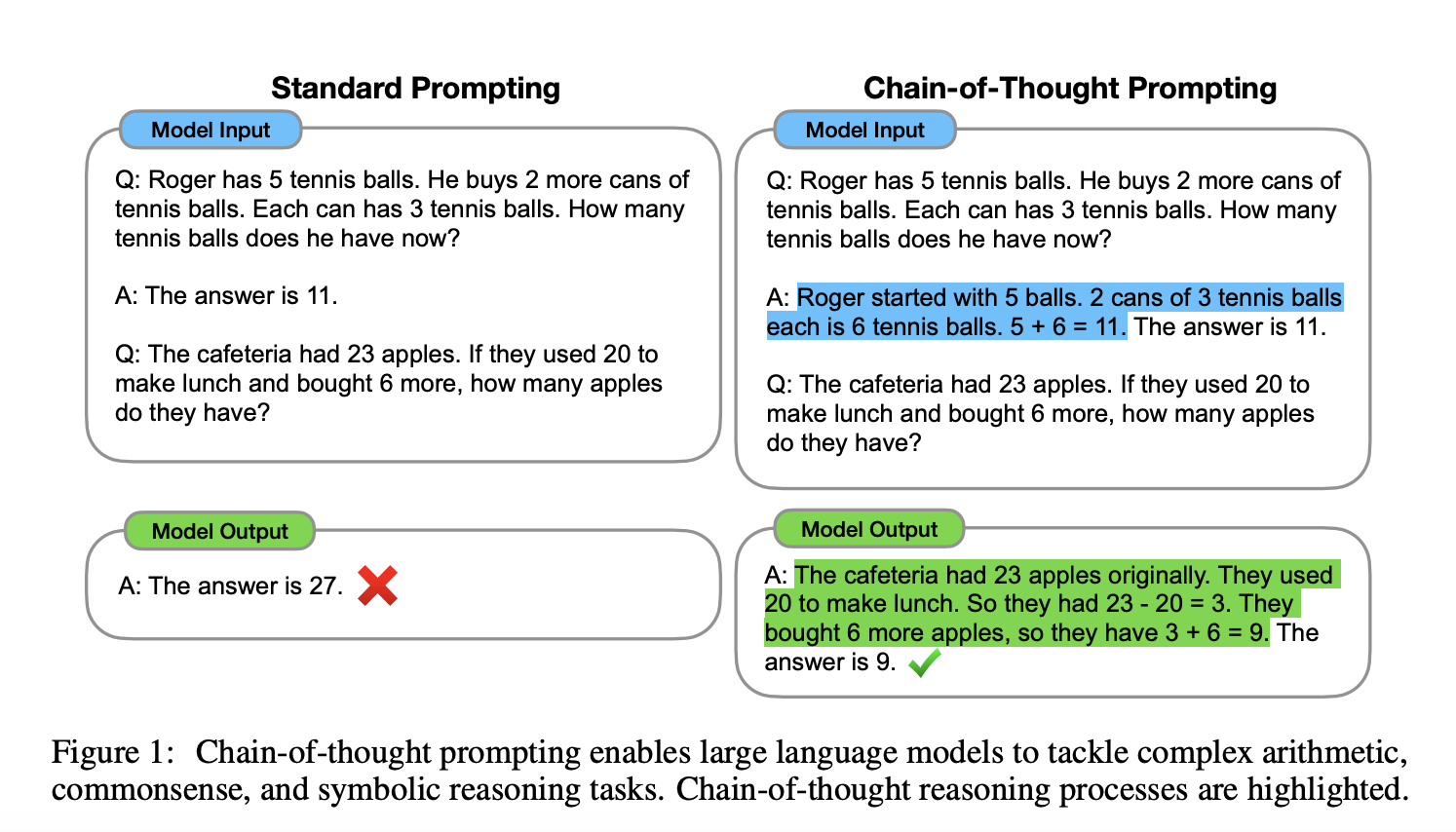
Chain-of-Thought (CoT) is a prompting technique that encourages LLMS to break down complex problems into step-by-step reasoning processes, much like how we reasoned through the logical steps to cross an intersection above. Instead of jumping directly to a final answer, chain of thought prompting asks the model to communicate its intermediate thinking steps, making it's reasoning process both transparent and often more accurate.
First introduced in 2022, Chain-of-Thought (CoT) marked a breakthrough in improving LLMs' ability to handle complex reasoning tasks. Rather than jumping straight to an answer, the technique instead guides the model by explicitly laying out intermediate reasoning steps through examples - a method known as few-shot prompting. In the original paper, researchers illustrated the impact of CoT prompting by comparing it to standard prompting on a simple elementary math problem:
Chain-of-Thought prompting was further refined shortly later in 2022 by researcher Kojima, who discovered that simply adding the instruction "let's think step-by-step" could achieve similar performance gains without requiring explicit examples and thus cutting down on token consumption. This advancement, known as Auto-CoT or Zero-Shot CoT, made the technique far more practical for everyday use.
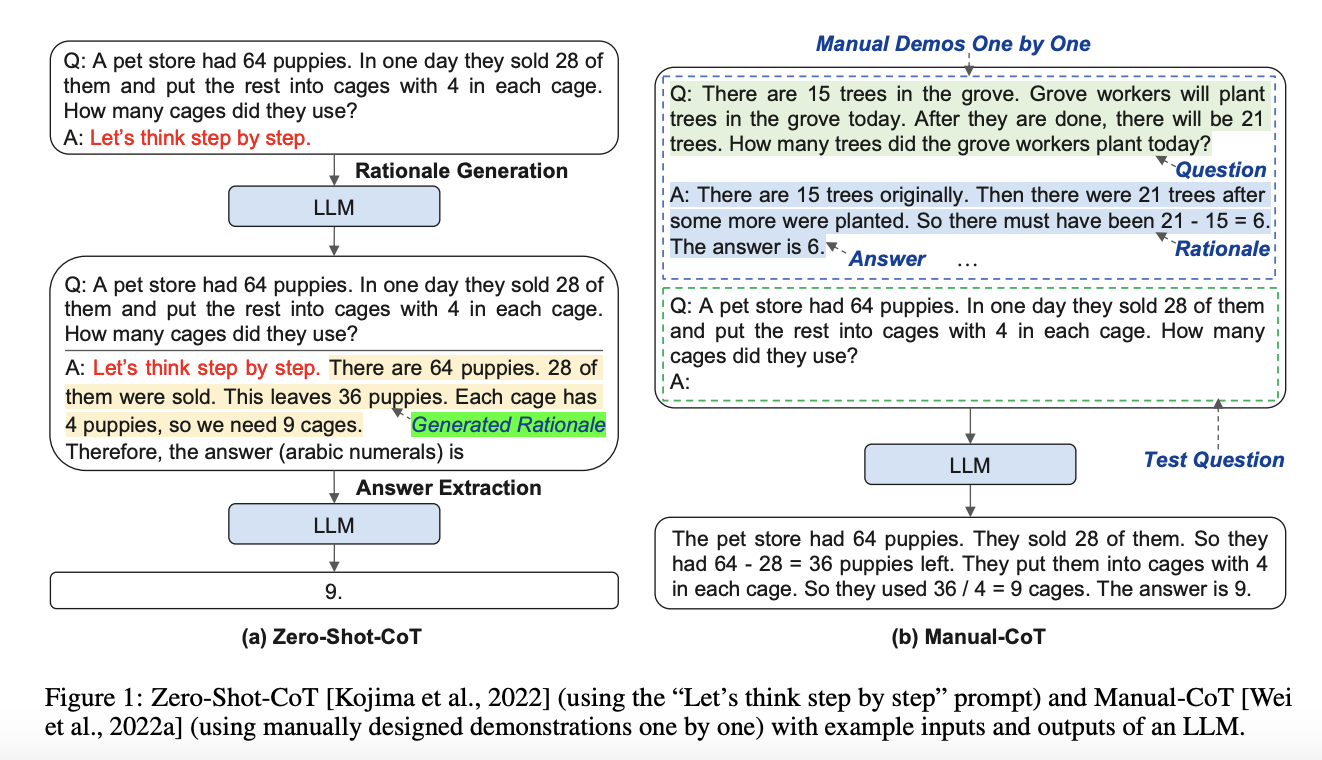
As we can see through OpenAI's and Anthropic's documentation, "let's think step-by-step" is now the recommended instruction when encouraging models to employ CoT reasoning, indicating it has become an industry standard. And so, this is exactly the approach we'll adopt to help guide our nutritions agent's thought process within our planning module to help guide it during evaluation process.
Using XML Tags
We're nearly ready to implement our planning module, but one critical piece is still missing - a mechanism for our nutrition agent to clearly distinguish between different inputs and outputs. This is where XML tags come into play!
For those unfamiliar with what an XML tag is, XML tags are markup elements that use angle brackets to define and structure data, similar to HTML but more flexible and customizable. An XML tag consists of an opening tag and a closing tag that wrap around content, creating a container that labels and organizes information. For example, if we wanted to represent my name and age with XML tags, we might use:
<name>Zac Messinger</name>
<age>34</age>
The great thing about XML tags is that when we are ready to extract data from our agents response, we can also use them as delimiters to parse out the specific pieces of information we need through regular expressions. So the advantage is twofold - not only do XML tags help the agent better understand our instructions, but it also helps us better understand it's responses.
With a formatting strategy in place, let's implement our planning module using a carefully crafted prompt. We'll use 4 unique sets of XML tags to help our structure our agents planning capabilities:
<thinking>: Provides a high level summary of the agent's reasoning and plan of action, used mainly for traceability and debugging.<tool>: Specifies a request to use a tool, including the tool name, a unique ID, and the required parameters. We'll later this to execute the tool via a tool router.<final_answer>: Contains the agent's completed response after all reasoning and tool calls are finished. This is the message that should be returned directly to the user.<error>: Signals that the agent encountered a problem, such as missing inputs or a failed tool call. Allows the agent to log, handle, or gracefully recover from errors
It's important to note that prompt engineering is more art than science due to the probabilistic nature of how LLMs generate responses. In a production environment, you would want to A/B test multiple prompt variations to determine which version produces the most accurate results for your specific agent objectives. For this post, I've already conducted that iterative testing and refinement
planning_module = """
Think step-by-step, and always include a <thinking> block describing your thought process with every response using this exact format:

<thinking>
To answer the user's question, I will use the weather_lookup tool to fetch the current weather for the city they mentioned.
</thinking>

If a tool is required, respond with the <tool> block using this exact format:

<tool>
{{
  "tool": "TOOL_NAME",
  "id": "Randomly generated UUID here",
  "parameters": {{
    "param1": "value1",
    "param2": "value2"
  }}
}}
</tool>

After a tool is called, you will recieve a subsequent message from the user with the results of the tool call in this exact format:

{{
  "type": "tool_result",
  "tool_use_id": TOOL_USE_UUID_HERE,
  "result": "RESULT_HERE"
}}

If you're arrived at your final response and no additional tool call is required, respond with the <final_answer> block using this exact format:

<final_answer>
FINAL ANSWER HERE
</final_answer>

If you encounter an error, respond with the <error> block using this exact format:

<error>
ERROR MESSAGE HERE
</error>

Do not add any additional explanation or text outside the XML tags. You cannot ask for any additional follow up information
"""
Since we haven't actually created our agent yet, let's test by focusing on validating whether the LLM returns responses in the XML format we expect, with specific emphasis on what's inside the <thinking>, <tool_use>, <error>, and <final_answer> tags outlined in our prompt. To do so, we'll create two simple functions which we'll later recycle when creating the core functionality of our agent framework.
generate_response: Sends a user message along with system instructions to OpenAI, and returns the LLM's response as text.get_action: Parses the LLM's response by extracting content from specific XML tags (thinking, tool, final_answer, error) and returns it as a structured dictionary.
def generate_response(content):
  # Create client
  client = OpenAI(api_key=OPENAI_API_KEY)

  response = client.chat.completions.create(
      model="gpt-4.1",
      temperature=0,
      messages=[
          {"role": "system", "content": planning_module},
          {"role": "user", "content": content}
      ]
  )
  # Return response content & add to memory
  response_text = response.choices[0].message.content
  return response_text

def get_action(response):
  # Extract content from XML Tags
  thinking_content = re.search(r"<thinking>(.*?)</thinking>", response, re.DOTALL)
  tool_use_content = re.search(r"<tool>(.*?)</tool>", response, re.DOTALL)
  final_answer_content = re.search(r"<final_answer>(.*?)</final_answer>", response, re.DOTALL)
  error_content = re.search(r"<error>(.*?)</error>", response, re.DOTALL)

  # Parse content
  thinking = thinking_content.group(1).strip() if thinking_content else None
  tool_use = json.loads(tool_use_content.group(1).strip()) if tool_use_content else None
  final_answer = final_answer_content.group(1).strip() if final_answer_content else None
  error = error_content.group(1).strip() if error_content else None

  return {
    "thinking": thinking,
    "action": {
      "tool_use": tool_use,
      "final_answer": final_answer,
      "error": error
    }
  }

# Generate Response
content = "What color is the sky during the daytime?"
response = generate_response(content=content)
action = get_action(response)

print(f'<thinking>: {action['thinking']}')
print(f'<tool_use>: {action['action']['tool_use']}')
print(f'<error>: {action['action']['error']}')
print(f'<final_answer>: {action['action']['final_answer']}')
<thinking>: To answer the user's question, I will recall general knowledge about the color of the sky during the daytime.
<tool_use>: None
<error>: None
<final_answer>: The sky is typically blue during the daytime due to the scattering of sunlight by the atmosphere.
Creating a System Prompt
Before our agent can process user requests, it first needs a clear sense of identity - its role, capabilities, and operational framework. The planning module may teach our agent how to think through problems, but it doesn't tell the agent what problem it's solving or which tools it can use to solve them. That missing piece is the system prompt.
A system prompt (sometimes called a “system message”) is the instruction set that defines an AI agent's role, behavior, and constraints. Without it, the agent would be like a consultant who has mastered problem-solving techniques (the planning module) but doesn't know which company they work for, what the goals are, what resources are available, or what's already been discussed in past meetings. The system prompt fills in that context so every interaction is grounded in the agent's objectives, capabilities, and memory - not just its reasoning skills.
Just as we did with the planning module, I've gone ahead and prepared, tested, and refined a tailored system prompt for our nutrition agent to help guide it's behavior effectively. The system prompt will be built through a build_system_prompt function, which accepts our agents name, set of instructions (e.g goal), planning module, and system memory.
def build_system_prompt(name, instructions, planning_module, tools, memory):
  return f"""
  You are {name}, an AI agent working with the following instructions: {instructions}

  In this environment, you have access to a set of tools you can use to answer the user's question.

  String and scalar parameters should be specified as is, while lists and objects should use JSON format.

  Note that spaces for string values are not stripped. The output is not expected to be valid XML and is parsed with regular expressions.

  {planning_module}

  Here are the tools available:

  {json.dumps([tool.get_schema() for tool in tools], indent=2)}

  Here is your past interaction history. Always reference this to recall useful information from before deciding on a next step.

  {[message for message in memory.get()]}
  """

# Agent Name & Instructions
name = "Body Building Agent"
instructions = "Your goal is calculate the users Total Daily Energy Expenditure (TDEE), and then figure out if they should increase, maintain, or decrease their calories."
# Agent Tools & Memory
tools = [tdee_calculator_tool, calorie_adjustment_calculator_tool]
memory = Memory(max_limit=10)
# Craft system prompt
system_prompt = build_system_prompt(name, instructions, planning_module, [tdee_calculator_tool calorie_adjustment_calculator_tool], memory)
# Build System Prompt
print(system_prompt)
Running this function outputs a large text string that represents all of the agent's accumulated context to date, forming the context window the agent will rely on.
You are Body Building Agent, an AI agent working with the following instructions: Your goal is calculate the users Total Daily Energy Expenditure (TDEE), and then figure out if they should increase, maintain, or decrease their calories.

In this environment, you have access to a set of tools you can use to answer the user's question.

String and scalar parameters should be specified as is, while lists and objects should use JSON format.

Note that spaces for string values are not stripped. The output is not expected to be valid XML and is parsed with regular expressions.


Think step-by-step, and always include a <thinking> block describing your thought process with every response using this exact format:

<thinking>
To answer the user's question, I will use the weather_lookup tool to fetch the current weather for the city they mentioned.
</thinking>

If a tool is required, respond with the <tool> block using this exact format:

<tool>
{{
  "tool": "TOOL_NAME",
  "id": "Randomly generated UUID here",
  "parameters": {{
    "param1": "value1",
    "param2": "value2"
  }}
}}
</tool>

After a tool is called, you will recieve a subsequent message from the user with the results of the tool call in this exact format:

{{
  "type": "tool_result",
  "tool_use_id": TOOL_USE_UUID_HERE,
  "result": "RESULT_HERE"
}}

If you're arrived at your final response and no additional tool call is required, respond with the <final_answer> block using this exact format:

<final_answer>
FINAL ANSWER HERE
</final_answer>

If you encounter an error, respond with the <error> block using this exact format:

<error>
ERROR MESSAGE HERE
</error>

Do not add any additional explanation or text outside the XML tags. You cannot ask for any additional follow up information


Here are the tools available:

[
{
  "name": "tdee_calculator",
  "description": "Tool that calculates the Total Daily Energy Expenditure (TDEE) for a person based on the given parameters.",
  "parameters": {
    "weight": {
      "type": "number",
      "description": "Weight in kilograms or pounds."
    },
    "weight_unit": {
      "type": "string",
      "description": "Weight measurement unit ('kg' or 'lb').",
      "enum": [
        "kg",
        "lb"
      ]
    },
    "height": {
      "type": "number",
      "description": "Height in centimeters or inches."
    },
    "height_unit": {
      "type": "string",
      "description": "Height measurement unit ('cm' or 'in').",
      "enum": [
        "cm",
        "in"
      ]
    },
    "age": {
      "type": "integer",
      "description": "Age in years."
    },
    "gender": {
      "type": "string",
      "description": "Gender ('male' or 'female').",
      "enum": [
        "male",
        "female"
      ]
    },
    "activity_level": {
      "type": "string",
      "description": "Activity level ('sedentary', 'lightly active', 'moderately active', 'very active', or 'extra active').",
      "enum": [
        "sedentary",
        "lightly active",
        "moderately active",
        "very active",
        "extra active"
      ]
    }
  },
  "required": [
    "weight",
    "weight_unit",
    "height",
    "height_unit",
    "age",
    "gender",
    "activity_level"
  ]
},
{
  "name": "calorie_adjustment_calculator",
  "description": "Tool that calculates the calorie adjustment to the persons daily diet based on the given parameters",
  "parameters": {
    "goal": {
      "type": "string",
      "description": "Users fitness goal",
      "enum": [
        "gain",
        "maintain",
        "cut"
      ]
    },
    "current_weight": {
      "type": "string",
      "description": "Current week's average weight in kilograms or pounds.",
      "enum": [
        "kg",
        "lb"
      ]
    },
    "previous_weight": {
      "type": "number",
      "description": "Previous week's average weight in kilograms or pounds."
    },
    "weight_unit": {
      "type": "string",
      "description": "Weight measurement unit ('kg' or 'lb').",
      "enum": [
        "kg",
        "lb"
      ]
    },
    "tdee": {
      "type": "number",
      "description": "The users TDEE (total daily energy expenditure)"
    }
  },
  "required": [
    "goal",
    "current_weight",
    "previous_weight",
    "weight_unit",
    "tdee"
  ]
}
]

Here is your past interaction history. Always reference this to recall useful information from before deciding on a next step.

[]
Creating a Tool Router
With a system prompt to define its role and a planning module to guide its reasoning, our agent now knows what to do, but it still needs a way to actually act on those decisions. That's where the tool router comes in. Think of it as the agent's execution engine - when the planning module outputs a request like {"tool": "tdee_calculator", "parameters": {"age": 25, "weight": 150}}, the router interprets that instruction, locates the correct function, and runs it with the provided parameters.
Without a router, the agent would be like a chef who can design the perfect recipe but has no way to use the stove or utensils. The tool router is the bridge between planning and action, transforming structured tool requests into real function calls that deliver the information the agent needs to progress to the next evolution in it's decision making process.
Let's kick off implementing a tool router by refactoring our generate_response function to take advantage of the new build_system_prompt function:
def generate_response(content):
  # Create client
  client = OpenAI(api_key=OPENAI_API_KEY)
  # Add to memory & generate response
  memory.add("user", content)
  # Build system prompt
  system_prompt = build_system_prompt(instructions, planning_module, [tdee_calculator_tool, calorie_adjustment_calculator_tool], memory)

  response = client.chat.completions.create(
      model="gpt-4.1",
      temperature=0,
      messages=[
          {"role": "system", "content": system_prompt},
          {"role": "user", "content": content}
      ]
  )

  # Return response content & add to memory
  response_text = response.choices[0].message.content
  memory.add("assistant", response_text)
  return response_text
Next, let's quickly recall the inputs our two tools (tdee_calculator_tool & calorie_adjustment_calculator_tool) will require in order to run without error.
weight (float): Weight in kilograms or pounds.
weight_unit (str): 'kg' for kilograms or 'lb' for pounds.
height (float): Height in centimeters or inches.
height_unit (str): 'cm' for centimeters or 'in' for inches.
age (int): Age in years.
gender (str): 'male' or 'female'.
activity_level (str): 'sedentary', 'lightly active', 'moderately active', 'very active', or 'extra active'.
goal (str): Fitness goal, either 'cut', 'maintain', or 'gain'.
current_weight (float): Current week's average weight in kilograms or pounds.
previous_weight (float): Previous week's average weight in kilograms or pounds.
weight_unit (str): 'kg' for kilograms or 'lb' for pounds.
tdee (int): TDEE in kilocalories per day.
In a live application, these inputs would be loaded dynamically, either from a user-facing interface (e.g, a frontend) or from an external data source like a database (via another tool). For testing, we'll instead hardcode the parameters each tool requires into variables so we can instead focus on the tool router's execution.
# Collected Information
parameters = {
  "weight": 210,
  "weight_unit": "lb",
  "height": 76,
  "height_unit": "in",
  "age": 34,
  "gender": "male",
  "activity_level": "moderately active",
  "current_weight": 210,
  "previous_weight": 211,
  "goal": "gain",
}

content = f"""
  <parameters>
  weight: {parameters['weight']}
  weight_unit: {parameters['weight_unit']}
  height: {parameters['height']} {parameters['height_unit']}
  height_unit: {parameters['height_unit']}
  age: {parameters['age']}
  gender: {parameters['gender']}
  activity_level: {parameters['activity_level']}
  goal: {parameters['goal']}
  current_weight: {parameters['current_weight']}
  previous_weight: {parameters['previous_weight']}
  </parameters>
"""
From the XML structure we earlier outlined in our planning module, we can establish two key rules for how the agent decides when and how to use a tool:
- Tool invocation signal: If the XML block is populated (i.e. not
None), it indicates that the agent has determined a tool call is required. - Invocation details: The contents of the block provide all the structured information needed to perform that call. Specifically, it includes the name of the tool to execute, a unique identifier to track the request/response cycle, and a parameters object that defines the exact inputs required by the tool according to its schema.
With these two conditions established, we can reliably interpret the agent's intent and convert its structured output into concrete function calls. Here's an example of the response format we can expect:
<tool>
{{
  "tool": "TOOL_NAME",
  "id": "Randomly generated UUID here",
  "parameters": {{
    "param1": "value1",
    "param2": "value2"
  }}
}}
</tool>
For execution, the most important parts of this payload are the tool and parameters fields. The tool property specifies which function should be called, while the parameters object contains the exact inputs to pass into that function - aligned with the tool schema defined in our planning module.
Once we have this information, invoking a tool becomes straightforward, as we can simply reference the tool's name and pass in the corresponding parameters. To handle this systematically, we'll implement a tool_router function that parses the block, executes the appropriate function, and returns the result in a consistent JSON format:
def tool_router(tool):
  result = None
  # Get tool name & properities
  tool_name= tool["tool"]
  tool_params = tool["parameters"]
  # Call Tools
  if tool_name == "tdee_calculator": result = tdee_calculator(**tool_params)
  elif tool_name == "calorie_adjustment_calculator": result = calorie_adjustment_calculator(**tool_params)
  else:return f"Unknown tool: {tool_name}"
  # Return formatted response
  return json.dumps({ 'type': 'tool_result', 'tool_use_id': tool["id"], 'result': result})
Time to put this to the test! Let's ask our soon-to-be agent for a response and see which action it decides to take:
# Agent Instructions
instructions = "Your goal is calculate the users Total Daily Energy Expenditure (TDEE), and then figure out if they should increase, maintain, or decrease their calories."
# Agent Tools
tools = [tdee_calculator_tool, calorie_adjustment_calculator_tool]
# Agent Memory
memory = Memory(max_limit=10)
# Agent Name
name = "Body Building Agent"

# Generate Response
response = generate_response(content=content)
action = get_action(response)

# Record agent thinking to scratchpad
print(f'<thinking>: {action['thinking']}')
print(f'<tool_use>: {action['action']['tool_use']}')
print(f'<error>: {action['action']['error']}')
print(f'<final_answer>: {action['action']['final_answer']}')
<thinking>: To answer the user's question, I will first calculate their Total Daily Energy Expenditure (TDEE) using the provided parameters.
<tool_use>: {'tool': 'tdee_calculator', 'id': 'b7e2c6e2-2b7a-4e2a-9c1a-1e2b7c6e2a9c', 'parameters': {'weight': 210, 'weight_unit': 'lb', 'height': 76, 'height_unit': 'in', 'age': 34, 'gender': 'male', 'activity_level': 'moderately active'}}
<error>: None
<final_answer>: None
Perfect! Our agent has identified that we need to use the tdee_calculator tool in order to calculate the users total daily energy expenditure, which is exactly the outcome we were hoping for! Next, let's pass in the information from the <tool> delimiter to our tool_router in order to do just that:
# Call tool router with information from the <tool> XML tag.
result = tool_router(tool=action['action']['tool'])
print(result)
{"type": "tool_result", "tool_use_id": "b7e2c6e2-2b7a-4e2a-9c1a-1e2b7c6e2a9c", "result": 3091}
So far, so good! But since our ultimate goal is to determine not only whether a user should increase or decrease their daily caloric intake, but also by how much, we're not finished yet. The next step is to feed this result back into our agent and see how it builds on that information:
# Generate Response
response = generate_response(content=result)
action = get_action(response)

# Record agent thinking to scratchpad
print(f'<thinking>: {action['thinking']}')
print(f'<tool_use>: {action['action']['tool_use']}')
print(f'<error>: {action['action']['error']}')
print(f'<final_answer>: {action['action']['final_answer']}')
<thinking>: Now that I have calculated the user's TDEE as 3091 calories, I will use the calorie_adjustment_calculator to determine if they should increase, maintain, or decrease their calories based on their goal (gain) and recent weight change (from 211 lb to 210 lb).
<tool_use>: {'tool': 'calorie_adjustment_calculator', 'id': 'e3a1b2c3-d4e5-4f6a-8b7c-9d0e1f2a3b4c', 'parameters': {'goal': 'gain', 'current_weight': '210', 'previous_weight': 211, 'weight_unit': 'lb', 'tdee': 3091}}
<error>: None
<final_answer>: None
Our agent has now determined that it needs to call the calorie_adjustment_calculator tool to reach its final answer. Let's repeat the process once more:
# Call tool router with information from the <tool_use> XML tag.
result = tool_router(tool=action['action']['tool_use'])
print(result)

# Generate Response
response = generate_response(content=result)
action = get_action(response)

# Record agent thinking to scratchpad
print(f'<thinking>: {action['thinking']}')
print(f'<tool_use>: {action['action']['tool_use']}')
print(f'<error>: {action['action']['error']}')
print(f'<final_answer>: {action['action']['final_answer']}')
{"type": "tool_result", "tool_use_id": "e3a1b2c3-d4e5-4f6a-8b7c-9d0e1f2a3b4c", "result": 3391}
<thinking>: The calorie_adjustment_calculator has determined that, based on your goal to gain weight and your recent weight loss, you should increase your daily calorie intake to 3391 calories.
<tool_use>: None
<error>: None
<final_answer>: To support your goal of gaining weight, you should increase your daily calorie intake to 3391 calories.
With that final step, our agent has reached its conclusion. Based on the calculated TDEE of 3,091 calories, it recommends increasing daily intake to 3,391 calories in order to support a weight gain goal. That's exactly the kind of reasoning chain we set out to build - and it's a pretty impressive milestone!
That said, what we have so far is still only partially agentic. We've proven that our tools, memory, and planning modules can work together, but notice that we had to manually trigger the tool_router after each tool call. By our north star definition, a truly autonomous agent is one that decides for itself how many steps are required, and continues looping until it arrives at a final resolution.
Creating the Agentic Loop
To kick off the agentic loop, we'll start by resetting our agent's state to give us a clean slate to build on:
# Agent Name & Instructions
name = "Body Building Agent"
instructions = "Your goal is calculate the users Total Daily Energy Expenditure (TDEE), and then figure out if they should increase, maintain, or decrease their calories."
# Agent Tools & Memory
tools = [tdee_calculator_tool, calorie_adjustment_calculator_tool]
memory = Memory(max_limit=10)
Next, we'll implement a run function that serves as the entry point for our autonomous loop:
def run(content: str):
  _iterations = 0
  # Generate Response
  response = generate_response(content=content)
  action = get_action(response)
  # Print Agents Thought Process
  print("THINKING:", action["thinking"])

  while action["action"]["tool_use"] != None:
    # Execute tool & pass in formatted response to LLM
    result = tool_router(tool=action["action"]["tool_use"])
    response = generate_response(content=result)
    action = get_action(response)
    print(action)
    print("THINKING:", action["thinking"])
    # Increase max iterations by 1
    _iterations += 1

  return action["action"]["final_answer"] or action["action"]["error"]
The logic here is simple - we generate an initial response from our starting inputs, then use a while loop to let the agent feed its outputs back into itself until no further tools are required. When the loop ends, we return the response wrapped in the <final_answer> tag, which will be the nutrition agents final answer.
Now, let's put it to the test!
result = run(content=content)
print("---")
print(result)
THINKING: To answer the user's question, I will first calculate their Total Daily Energy Expenditure (TDEE) using the provided parameters. Then, I will determine if they should increase, maintain, or decrease their calories based on their goal (gain) and recent weight change.
{'thinking': "Now that I have calculated the user's TDEE (3091 kcal), I will use the calorie_adjustment_calculator to determine if they should increase, maintain, or decrease their calories based on their goal (gain) and the fact that their weight decreased from 211 lb to 210 lb over the past week.", 'action': {'tool_use': {'tool': 'calorie_adjustment_calculator', 'id': 'a7f8e9d0-1234-4bcd-8ef0-567890abcdef', 'parameters': {'goal': 'gain', 'current_weight': '210', 'previous_weight': 211, 'weight_unit': 'lb', 'tdee': 3091}}, 'final_answer': None, 'error': None}}
THINKING: Now that I have calculated the user's TDEE (3091 kcal), I will use the calorie_adjustment_calculator to determine if they should increase, maintain, or decrease their calories based on their goal (gain) and the fact that their weight decreased from 211 lb to 210 lb over the past week.
{'thinking': 'The calorie_adjustment_calculator has determined that, based on your goal to gain weight and your recent weight decrease, you should increase your daily calorie intake to 3391 kcal.', 'action': {'tool_use': None, 'final_answer': 'To support your goal of gaining weight, you should increase your daily calorie intake to 3391 kcal.', 'error': None}}
THINKING: The calorie_adjustment_calculator has determined that, based on your goal to gain weight and your recent weight decrease, you should increase your daily calorie intake to 3391 kcal.
---
To support your goal of gaining weight, you should increase your daily calorie intake to 3391 kcal.
Putting it all together
I know this has been a technical and complex journey, but we're about to bring it all together by combining the functionality we've tested and validated independently into a single, cohesive agent class. Since we've already covered all of this functionality in detail, let's just quickly review the key methods that make up our framework:
build_system_prompt: Builds a system prompt that combines the agent's identity and instructions with available tools, planning methodology, and conversation history to provide the LLM with complete context for decision-making.tool_router: Executes the appropriate tool based on the tool name, passes the provided parameters to it, and returns the result in a standardized JSON format for the agent to process.RetryClaude can make mistakes. Please double-check responses.get_action: Parses the LLM's response by extracting content from specific XML tags (thinking, tool, final_answer, error) and returns it as a structured dictionary.generate_response: Sends a user message along with system instructions to OpenAI, and returns the LLM's response as text.run: Executes the agent's main processing loop, continuously generating responses and executing tools until no more tools are needed or the iteration limit is reached, then returns either the final answer.
The only real enhancements to note are safety controls that define a maximum iterations limit to prevent infinite loops, along with explicit testing modes that provide detailed debugging information via a verbose setting. Other than that, the code is pretty much verbatium what we've defined above!
class Agent(BaseModel):
    name: str = Field(..., description="The name of the agent.")
    instructions: str = Field(..., description="The instructions for the agent.")
    tools: List[Tool] = Field(..., description="The tools the agent has access to.")
    verbose: bool = Field(False, description="Whether to print the agents thinking")
    testing: bool = Field(False, description="Whether to return the agents scratchpad.")

    # Private attributes
    _memory: Memory = PrivateAttr(default_factory=Memory) # Short-term memory to to record past interactions.
    _scratchpad: List[str] = PrivateAttr(default=[]) # Scratchpad to record agents thinking process.
    _system_prompt: str = PrivateAttr(default="") # System prompt
    _max_iterations: int = PrivateAttr(default=5) # Maximum number of iterations for agent looping

    # Allows the instantiated model to use arbitrary pydantic types
    model_config = {"arbitrary_types_allowed": True}

    def build_system_prompt(self):
      return f"""
        You are {self.name}, an AI agent working with the following instructions: {self.instructions}

        In this environment, you have access to a set of tools you can use to answer the user's question.

        String and scalar parameters should be specified as is, while lists and objects should use JSON format.
        Note that spaces for string values are not stripped. The output is not expected to be valid XML and is parsed with regular expressions.

        {planning_module}

        Here are the tools available:

        {json.dumps([tool.get_schema() for tool in self.tools], indent=2)}

        Here is your past interaction history. Always reference this to recall useful information from before deciding on a next step.

        {[message for message in self._memory.get()]}
      """

    def get_action(self, response):
      # Extract content from XML Tags
      thinking_content = re.search(r"<thinking>(.*?)</thinking>", response, re.DOTALL)
      tool_use_content = re.search(r"<tool>(.*?)</tool>", response, re.DOTALL)
      final_answer_content = re.search(r"<final_answer>(.*?)</final_answer>", response, re.DOTALL)
      error_content = re.search(r"<error>(.*?)</error>", response, re.DOTALL)

      # Parse content & return formatted response
      thinking = thinking_content.group(1).strip() if thinking_content else None
      tool_use = json.loads(tool_use_content.group(1).strip()) if tool_use_content else None
      final_answer = final_answer_content.group(1).strip() if final_answer_content else None
      error = error_content.group(1).strip() if error_content else None

      return {
        "thinking": thinking,
        "action": { "tool_use": tool_use, "final_answer": final_answer, "error": error }
      }

    def tool_router(self, tool):
      result = None
      # Get tool name & properities
      tool_name= tool["tool"]
      tool_params = tool["parameters"]

      # Call Tools
      if tool_name == "tdee_calculator": result = tdee_calculator(**tool_params)
      elif tool_name == "calorie_adjustment_calculator": result = calorie_adjustment_calculator(**tool_params)
      else:return f"Unknown tool: {tool_name}"

      # Return formatted response
      return json.dumps({ 'type': 'tool_result', 'tool_use_id': tool["id"], 'result': result})

    def generate_response(self, content):
      # Create client
      client = OpenAI(api_key=OPENAI_API_KEY)
      # Add to memory & Build system prompt
      self._memory.add("user", content)
      system_prompt = self.build_system_prompt()

      response = client.chat.completions.create(
          model="gpt-4.1",
          temperature=0,
          messages=[{"role": "system", "content": system_prompt}, {"role": "user", "content": content}]
      )

      # Return response content & add to memory
      response_text = response.choices[0].message.content
      # Add response to memory
      self._memory.add("assistant", response_text)
      return response_text

    def run(self, content: str):
      # Generate Response
      response = self.generate_response(content=content)
      action = self.get_action(response)
      # Record agent thinking to scratchpad
      self._scratchpad.append(action["thinking"])
      if self.verbose: print("THINKING:", action["thinking"])

      while action["action"]["tool_use"] != None or self._max_iterations < 5:
        result = self.tool_router(tool=action["action"]["tool_use"])
        response = self.generate_response(content=result)
        action = self.get_action(response)
        # Add response to memory & record agent thinking to scratchpad
        self._scratchpad.append(action["thinking"])
        if self.verbose: print("THINKING:", action["thinking"])
        # Increase max iterations by 1
        self._max_iterations += 1

      # Add to agent scatchpad to validate thinking for testing
      if self.testing: return { "memory": self._memory, "action": action }
      else: return action["action"]["final_answer"] or action["action"]["error"]
We can create our nutrition agent by giving it a name, instructions that define its purpose, and access to the same tools we previously defined. Additionally, we can use the verbose setting to print each step in it's thinking process, which should align with what we observed previously during our isolated component testing.
agent = Agent(
  name="Nutrition Agent",
  instructions="Your goal is calculate the users Total Daily Energy Expenditure (TDEE), and then figure out if they should increase, maintain, or decrease their calories.",
  tools=[tdee_calculator_tool, calorie_adjustment_calculator_tool],
  verbose=True
)
All that's left is to run our agent with the same test parameters as before. If everything is working properly, we should see the same outcome as in our earlier test: a recommendation to increase daily caloric intake to 3,391 calories.
# Test Thinking Module
parameters = {
  "weight": 210,
  "weight_unit": "lb",
  "height": 76,
  "height_unit": "in",
  "age": 34,
  "gender": "male",
  "activity_level": "moderately active",
  "current_weight": 210,
  "previous_weight": 211,
  "goal": "gain",
}

message = f"""
  <parameters>
  weight: {parameters['weight']}
  weight_unit: {parameters['weight_unit']}
  height: {parameters['height']} {parameters['height_unit']}
  height_unit: {parameters['height_unit']}
  age: {parameters['age']}
  gender: {parameters['gender']}
  activity_level: {parameters['activity_level']}
  goal: {parameters['goal']}
  current_weight: {parameters['current_weight']}
  previous_weight: {parameters['previous_weight']}
  </parameters>
"""

output = agent.run(message)
print('---')
print(output)
THINKING: To answer the user's question, I will first calculate their Total Daily Energy Expenditure (TDEE) using the provided parameters.
THINKING: Now that I have the user's TDEE (3091 kcal), I will use the calorie_adjustment_calculator to determine if they should increase, maintain, or decrease their calories based on their goal (gain) and recent weight change (current: 210 lb, previous: 211 lb).
THINKING: The calorie_adjustment_calculator has determined that, based on your goal to gain weight and your recent weight trend, you should increase your daily calorie intake to 3391 kcal.
---
To support your goal of gaining weight, you should increase your daily calorie intake to 3391 kcal.
If you've made it this far, congratulations! We've just built a fully autonomous agent from scratch! That's no small feat, and it's worth pausing to appreciate how far we've come - from defining tools and memory, to planning, tool routing, and finally looping until the agent reaches its own conclusion.
As a final validation step, let's benchmark our implementation against OpenAI's Agent SDK to see how the two approaches compare. The only adjustment we need is to wrap our tools with OpenAI's function_tool decorator, ensuring they're compatible with the SDK's agent framework.
from agents import Agent, Runner, function_tool
from google.colab import userdata
os.environ["OPENAI_API_KEY"] = userdata.get('OPENAI_API_KEY')

@function_tool
def tdee_calculator(
    weight: float,
    weight_unit: str,
    height: float,
    height_unit: str,
    age: int,
    gender: str,
    activity_level: str):
    """
    Calculates the Total Daily Energy Expenditure (TDEE) for a person based on the given parameters.

    Inputs:
    weight (float): Weight in kilograms or pounds.
    weight_unit (str): 'kg' for kilograms or 'lb' for pounds.
    height (float): Height in centimeters or inches.
    height_unit (str): 'cm' for centimeters or 'in' for inches.
    age (int): Age in years.
    gender (str): 'male' or 'female'.
    activity_level (str): 'sedentary', 'lightly active', 'moderately active', 'very active', or 'extra active'.

    Returns:
    float: TDEE in kilocalories per day.
    """
    # Activity level mapping
    activity_levels = {
        'sedentary': 1.2,
        'lightly active': 1.375,
        'moderately active': 1.55,
        'very active': 1.725,
        'extra active': 1.9
    }
    # Determine 's' variable depending on if gender is male or female
    s = 5 if gender.lower() == 'male' else -161
    # Convert weight & height to kg and cm if needed
    weight = weight if weight_unit == 'kg' else weight * 0.454
    height = height if height_unit == 'cm' else height * 2.54
    # Calculate basal metabolic rate (BMR)
    bmr = (9.99 * weight) + (6.25 * height) - (5 * age - s)
    # Calculate total daily energy expenditure (TDEE)
    tdee = bmr * activity_levels[activity_level]
    # Return TDEE
    return round(tdee)

@function_tool
def calorie_adjustment_calculator(
    goal: str,
    current_weight: float,
    previous_weight: float,
    weight_unit: str,
    tdee: int):
    """
    Calculates the total kilocalories per day for a person to consume based on their TDEE, body weight trend, and fitness goal.

    Inputs:
    goal (str): Fitness goal, either 'cut', 'maintain', or 'gain'.
    current_weight (float): Current week's average weight in kilograms or pounds.
    previous_weight (float): Previous week's average weight in kilograms or pounds.
    weight_unit (str): 'kg' for kilograms or 'lb' for pounds.
    tdee (int): TDEE in kilocalories per day.

    Returns:
    int: Users new target calories intake per day.
    """
    adjustment = 0
    # Activity level mapping
    if goal == 'cut':
        adjustment = -300
    elif goal == 'gain':
        adjustment = 300

    return tdee + adjustment
Now let's spin up an OpenAI agent. You'll notice the instantiation process looks almost identical to our custom implementation, and if everything is wired up correctly, we should see the same result.
from agents import Agent, Runner

agent = Agent(
  name="Nutrition Agent",
  model="gpt-4.1",
  instructions=("Your goal is calculate the users Total Daily Energy Expenditure (TDEE), and then figure out if they should increase, maintain, or decrease their calories."),
  tools=[tdee_calculator, calorie_adjustment_calculator],
)

# Pass the dispute data to the triage agent
result = await Runner.run(agent, input=message)
print(result.final_output)
Your Total Daily Energy Expenditure (TDEE) is approximately 3,091 kcal/day.

Since your goal is to gain weight but your current weight has decreased from 211 lbs to 210 lbs in the past week, you should increase your daily calorie intake. Your new recommended calorie target is about 3,391 kcal per day to help you start gaining weight.
As the great Ric Flair would say, "Wooooooooooooooo"!
Conclusion
Thanks for joining me on this journey of building an AI agent from scratch! Along the way, we've seen how the three core components of an agent's architecture (tools, memory, and planning) work together to enable truly autonomous behavior. By implementing our own framework and comparing it against OpenAI's Agent SDK, we've also shown that the principles behind AI agents aren't mysterious or overly complex. They become approachable once you break them down into their fundamental parts!
Whether you decide to craft your own framework or build on existing solutions, understanding these foundations will make it easier to design AI systems that are not just powerful, but also effective, reliable, and purposeful. The future of AI isn't only about bigger models - it's about creating agents that can think, plan, and act autonomously to solve meaningful, real world problems.
Most importantly, I hope this deep dive has cut through the hype and given you a clearer picture of what an AI agent truly is, because it's certainly sharpened my own perspective. Until next time, happy building!